|
|
|
|
|
|
|
|
|
|
|
|
|
|
|
|
|
|
|
|
|
|
|
|
|
|
|
|
|
|
|
|
|
|
|
|
|
|
|
|
|
|
|
|
|
|
|
|
|
|
|
|
|
|
|
|
|
|
|
|
|
|
|
|
|
|
|
|
|
|
|
|
|
|
|
|
|
|
|
|
|
|
|
|
|
|
|
|
|
|
|
|
|
|
|
|
|
|
|
|
|
|
|
|
|
|
|
|
|
|
|
|
|
|
|
|
|
|
|
|
|
|
|
|
|
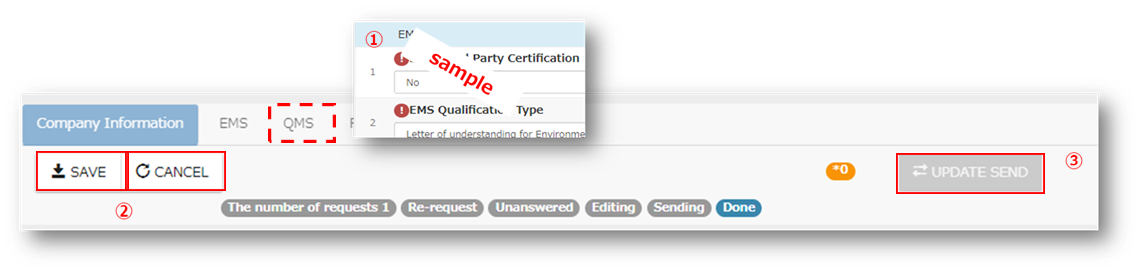
① |
Please review "!" fields and update accordingly. |
|
|
|
|
|
|
|
|
|
|
|
|
|
Clicking in each field,
will confirm the information in the sytem and the "!" mark will
disappear. |
|
|
|
|
|
|
|
|
② |
Click [Save] |
|
|
|
|
|
|
|
|
|
|
|
|
*If you would like to cancel. Click "CANCEL" |
|
|
|
|
|
|
|
|
|
|
|
③ |
Click "UPDATE SEND" |
|
|
|
|
|
|
|
|
|
|
|
|
*If there are "!" left, it means the required information is not complete,
therefore you cannot click on [UPDATE SEND] |
|
|
|
|
|
|
|
|
|
|
|
|
|
|
|
|
|
|
|
|
|
|
|
|
|
|
|
|
|
|
|
|
|
|
|
|
|
|
|
|
|
|
|
|
|
|
|
|
|
|
|
|
|
|
|
|
|
|
|
|
|
|
|
|
|
|
|
|
|
|
|
|
|
|
|
|
|
|
|
|
|
|
|
|
|
|
|
|
|
|
|
|
|
|
|
|
|
|
|
|
|
|
|
|
|
|
|
|
|
|
|
|
|
|
|
■Field explanations |
|
|
|
|
|
|
|
|
|
|
|
|
|
|
|
|
|
|
|
|
|
|
|
|
|
|
|
|
|
|
|
|
|
|
|
|
|
|
|
|
|
|
|
|
|
|
|
|
|
|
|
|
|
|
|
|
|
|
|
|
|
|
|
|
Explanation/e.g |
|
QMS Third
Party Certification |
If
you have Environmental Certification (ISO 9001) ,please select "Yes”. |
|
QMS
Qualification Type |
Please select
Qualification Type from the list. |
|
QMS Expiry
date |
Please input the expiry
date from the certification copy using the calendar |
|
QMS |
Please upload a copy of
the Certification. |

|
|
|
|
|
|
|
|
|
|
|
|
|
|
|
|
|
|
|
|
|
|
|
|
|
|
|
|
|
|
|
|
|
|
|
|
|
|
|
|
|
|
|
|
|
|
|
|
|
|
|
|
|
|
|
|
|
|
|
|
|
|
|
|
|
|
|
|
|
|
|
|
|
|
|
|
|
|
|
|
|
|
|
|
|
|
|
|
|
|
|
|
|
|
|
|
|
|
|
|
|
|
|
|
|
|
|
|
|
|
|
|
|
|
|
|
|
|
|
|
|
|
|
|
|
|
|
|
|
|
|
|
|
|
|
|
|
|
|
|
|
|
|
|
|
|
|
|
|
|
|
|
|
|
|
|
№ |
Question |
Answer |
|
|
|
|
|
|
|
|
|
|
1 |
Unable to click "UPDATE SEND" button. |
This happens because there are "!"
that have not been updated or completed. |
|
|
|
|
|
|
|
|
|
|
2 |
Clicked the "SAVE" button, but I would like to modify. |
Please click "CANCEL" |
|
|
|
|
|
|
|
|
|
|
3 |
Unable to modify a field. |
After modifying the changes and clicking on
"Sending" the information remains unchanged, please contact the
OSIS Help desk. |
|
|
|
|
|
|
|
|
|
|
4 |
Is the ISO 9001 certification copy of affiliated companies (parent
company/subsidiary) acceptable? |
QMS third party certification is only
acceptable for our own certificates. |
|
|
|
|
|
|
|
|
|
|
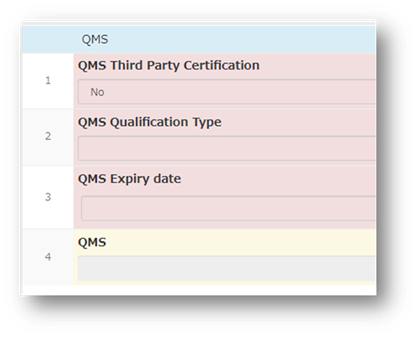
5 |
Do not have a QMS third-party certification.?
Input information as shown. |
|
|
|
|
|
|
|
|
|
|
|
6 |
QMS certificate not issued before or by the due
date.? |
Please contact OSIS Help desk. |
|
|
|
|
|
|
|
|
|
|
|
|
|
|
|
|
|
|
|
|
|
|
|
|
|
|
|
|
|
|
|
|
|
|
|
|
|
|
|
|